> ## Documentation Index
> Fetch the complete documentation index at: https://developers.fibery.com/llms.txt
> Use this file to discover all available pages before exploring further.
# Authentication
> Authenticate HTTP API requests using token-based authorization or OAuth.
Fibery API uses token-based authentication. That means you need to pass your API token with every request. This token should be the same for all requests, there is no need to generate a new one each time. Your API token carries the same privileges as your user, so be sure to keep it secret.
```javascript JavaScript theme={null}
const response = await fetch('https://YOUR_ACCOUNT.fibery.io/api/commands', {
method: 'POST',
headers: {
'Authorization': 'Token YOUR_TOKEN',
'Content-Type': 'application/json'
},
body: JSON.stringify({
command: 'fibery.entity/query',
args: {
query: {
'q/from': 'fibery/user',
'q/select': ['fibery/id', 'user/name'],
'q/where': ['=', ['fibery/id'], '$my-id'],
'q/limit': 1
}
}
})
});
const data = await response.json();
```
```bash cURL theme={null}
curl -X POST https://YOUR_ACCOUNT.fibery.io/api/commands \
-H 'Authorization: Token YOUR_TOKEN' \
-H 'Content-Type: application/json' \
-d '{
"command": "fibery.entity/query",
"args": {
"query": {
"q/from": "fibery/user",
"q/select": ["fibery/id", "user/name"],
"q/where": ["=", ["fibery/id"], "$my-id"],
"q/limit": 1
}
}
}'
```
Make sure to replace your account name and token with the actual values.
## Managing tokens
The number of tokens is limited to **3 per user**.
You can generate, list and delete tokens on the "API Tokens" page available from the workspace menu.
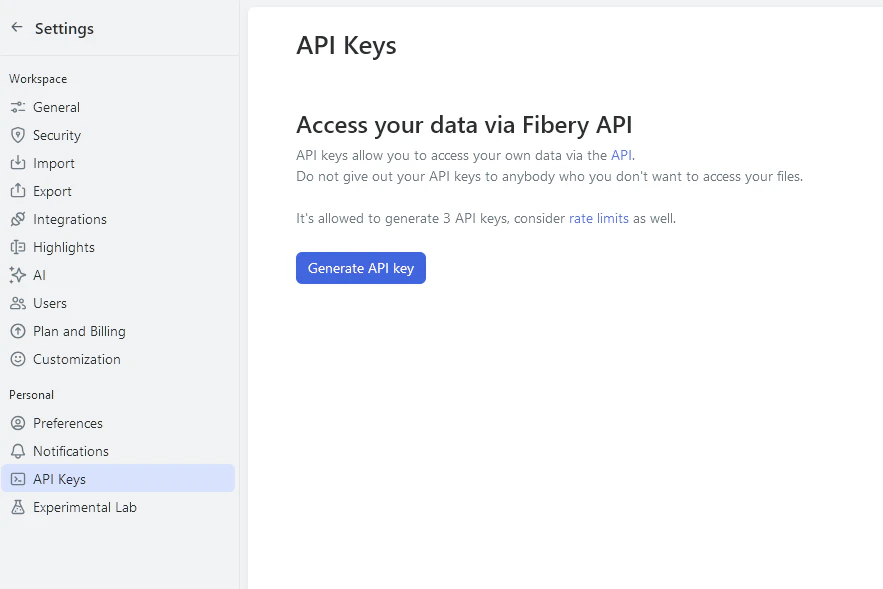 You can also manage the tokens directly using the API. The following endpoints are available to manage access tokens:
* `GET /api/tokens` — lists all access tokens that were given to current user
* `POST /api/tokens` — creates new token for current user
* `DELETE /api/tokens/:token_id` — deletes token by id
You need to be authenticated with a browser cookie or with an already existing token when accessing these endpoints.
## Request limits
To ensure system stability and consistent user experience, our API is rate-limited.
Rate-limited requests will return a "Too Many Requests" error (HTTP response status `429`). The rate limit for incoming requests is **3 requests per second per token**. Additionally the entire workspace is limited to 7 requests per second.
Rate limits may change. In the future we may adjust rate limits to balance for demand and reliability.
## OAuth flow
If your app acts on behalf of Fibery users, use OAuth 2.0 instead of a static API token. Once the flow completes, you get an access token that is used exactly like an API token — pass it as `Authorization: Bearer ` to every Fibery API request.
Note the scheme difference: OAuth access tokens use the `Bearer` prefix, while static API tokens use the `Token` prefix.
OAuth apps are not self-service. Contact Fibery Support to register your app. We'll create the client and share the `client_id`, `client_secret`, and whitelist your `redirect_uri`.
### Endpoints
Fibery uses the standard Authorization Code grant. Two endpoints live under `https://auth.fibery.io`:
| Purpose | Endpoint |
| ------------------------ | ------------------------------------------ |
| Authorization | `GET https://auth.fibery.io/oauth2/auth` |
| Token exchange & refresh | `POST https://auth.fibery.io/oauth2/token` |
### Scopes
| Scope | What it does |
| --------- | ------------------------------------------------------------------------------------------------------------- |
| `openid` | Returns an ID token with the authenticated user's identity. |
| `offline` | Returns a `refresh_token` alongside the access token so you can stay connected without re-prompting the user. |
Request both scopes unless you have a reason not to.
### Flow
Refer to [RFC 6749](https://datatracker.ietf.org/doc/html/rfc6749) for the spec details of each step — Fibery follows it as-is.
You can also manage the tokens directly using the API. The following endpoints are available to manage access tokens:
* `GET /api/tokens` — lists all access tokens that were given to current user
* `POST /api/tokens` — creates new token for current user
* `DELETE /api/tokens/:token_id` — deletes token by id
You need to be authenticated with a browser cookie or with an already existing token when accessing these endpoints.
## Request limits
To ensure system stability and consistent user experience, our API is rate-limited.
Rate-limited requests will return a "Too Many Requests" error (HTTP response status `429`). The rate limit for incoming requests is **3 requests per second per token**. Additionally the entire workspace is limited to 7 requests per second.
Rate limits may change. In the future we may adjust rate limits to balance for demand and reliability.
## OAuth flow
If your app acts on behalf of Fibery users, use OAuth 2.0 instead of a static API token. Once the flow completes, you get an access token that is used exactly like an API token — pass it as `Authorization: Bearer ` to every Fibery API request.
Note the scheme difference: OAuth access tokens use the `Bearer` prefix, while static API tokens use the `Token` prefix.
OAuth apps are not self-service. Contact Fibery Support to register your app. We'll create the client and share the `client_id`, `client_secret`, and whitelist your `redirect_uri`.
### Endpoints
Fibery uses the standard Authorization Code grant. Two endpoints live under `https://auth.fibery.io`:
| Purpose | Endpoint |
| ------------------------ | ------------------------------------------ |
| Authorization | `GET https://auth.fibery.io/oauth2/auth` |
| Token exchange & refresh | `POST https://auth.fibery.io/oauth2/token` |
### Scopes
| Scope | What it does |
| --------- | ------------------------------------------------------------------------------------------------------------- |
| `openid` | Returns an ID token with the authenticated user's identity. |
| `offline` | Returns a `refresh_token` alongside the access token so you can stay connected without re-prompting the user. |
Request both scopes unless you have a reason not to.
### Flow
Refer to [RFC 6749](https://datatracker.ietf.org/doc/html/rfc6749) for the spec details of each step — Fibery follows it as-is.