> ## Documentation Index
> Fetch the complete documentation index at: https://developers.fibery.com/llms.txt
> Use this file to discover all available pages before exploring further.
# GraphQL queries
> Learn how to query data using the Fibery GraphQL API.
# Queries
The list of entities can be retrieved from the database by using `find` query which is defined for every database for each space. For example `findBugs`, `findEmployees`.
Find more information about GraphQL queries [here](https://graphql.org/learn/queries).
 ## **List of entities**
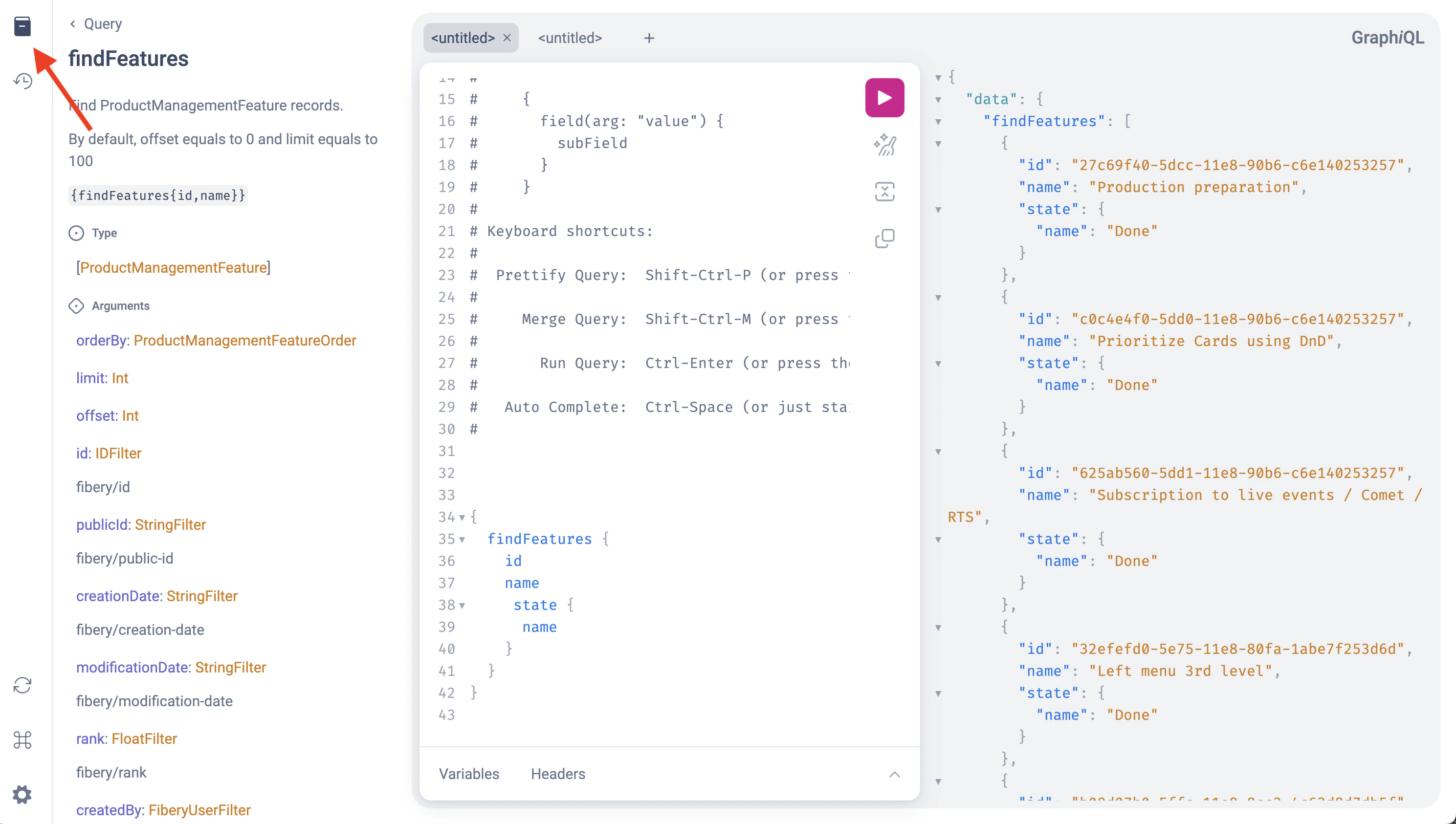
Use `findXXX` without arguments to retrieve all records, but note that there is a limit of 100 by default, so use offset and limit to retrieve data page by page if it is required.
```graphql theme={null}
{
findFeatures {
id
name
state {
name
}
}
}
```
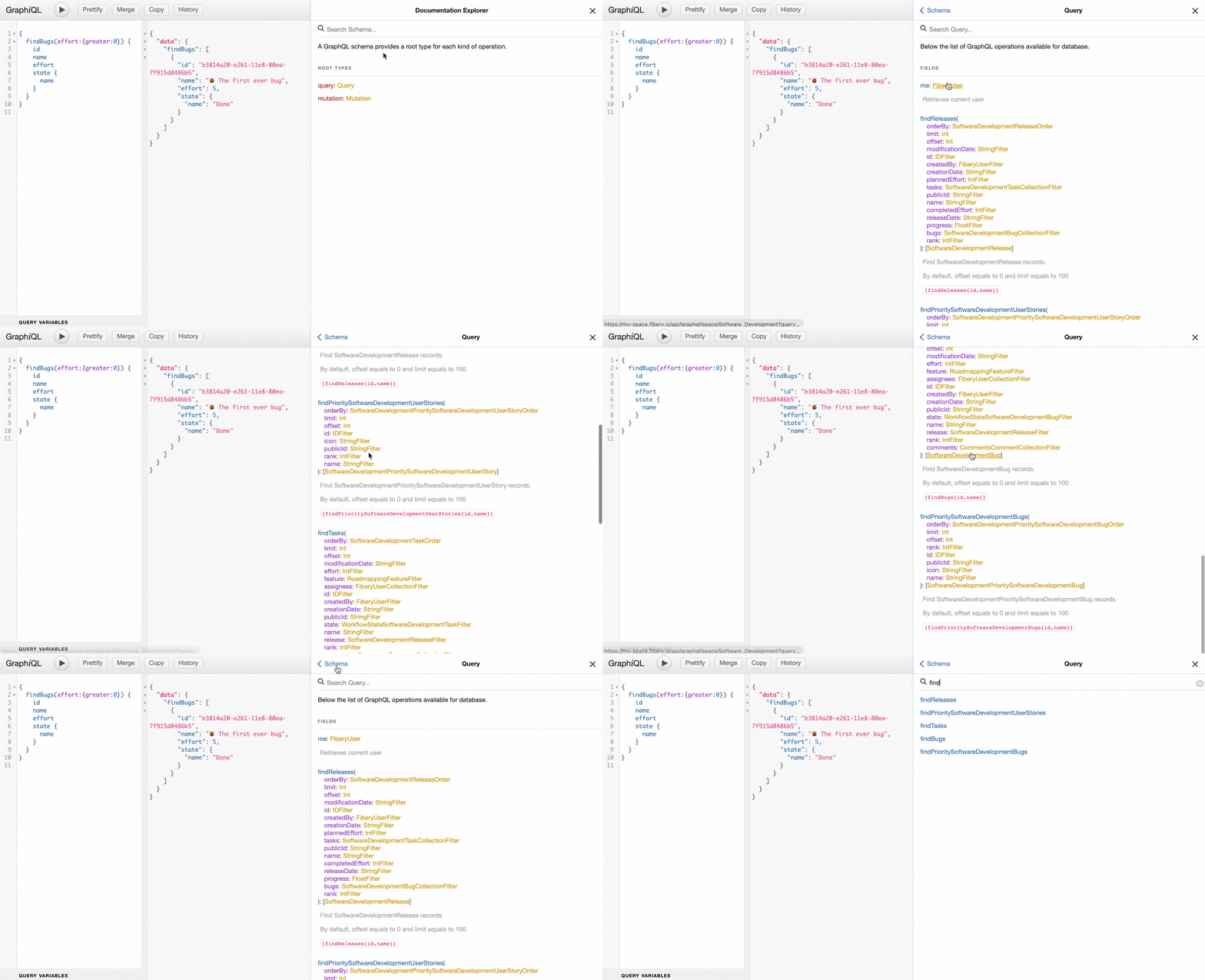
Use Docs → Query section to explore possible fields selection.
## **List of entities**
Use `findXXX` without arguments to retrieve all records, but note that there is a limit of 100 by default, so use offset and limit to retrieve data page by page if it is required.
```graphql theme={null}
{
findFeatures {
id
name
state {
name
}
}
}
```
Use Docs → Query section to explore possible fields selection.
 Curl:
```bash theme={null}
curl -X POST https://YOUR_ACCOUNT.fibery.io/api/graphql/space/Software_Development \
-H "Authorization: Token YOUR_TOKEN" \
-H "Content-Type: application/json" \
-d '{"query":"{findBugs{id,name,state{name}}}"}'
```
JavaScript:
```javascript theme={null}
import {config} from 'dotenv';
config();
import fetch from 'node-fetch';
const YOUR_SPACE_ENDPOINT = `https://YOUR_ACCOUNT.fibery.io/api/graphql/space/Software_Development`;
const YOUR_TOKEN = process.env[`YOUR_TOKEN`];
(async () => {
const query = `{findBugs{id,name,state{name}}}`;
const response = await fetch(YOUR_SPACE_ENDPOINT, {
method: 'POST',
body: JSON.stringify({query}),
headers: {
'Content-Type': `application/json`,
'Authorization': `Token ${YOUR_TOKEN}`,
}
});
const result = await response.json();
console.log(JSON.stringify(result));
})();
```
Output
```json theme={null}
{
"data": {
"findBugs": [
{
"id": "b3814a20-e261-11e8-80ea-7f915d8486b5",
"name": "🐞 The first ever bug",
"state": {
"name": "Done"
}
},
{
"id": "fa39df10-912b-11eb-a0bf-cb515797cdf8",
"name": "Nasty bug from the trenches",
"state": {
"name": "To Do"
}
}
]
}
}
```
## Filtering
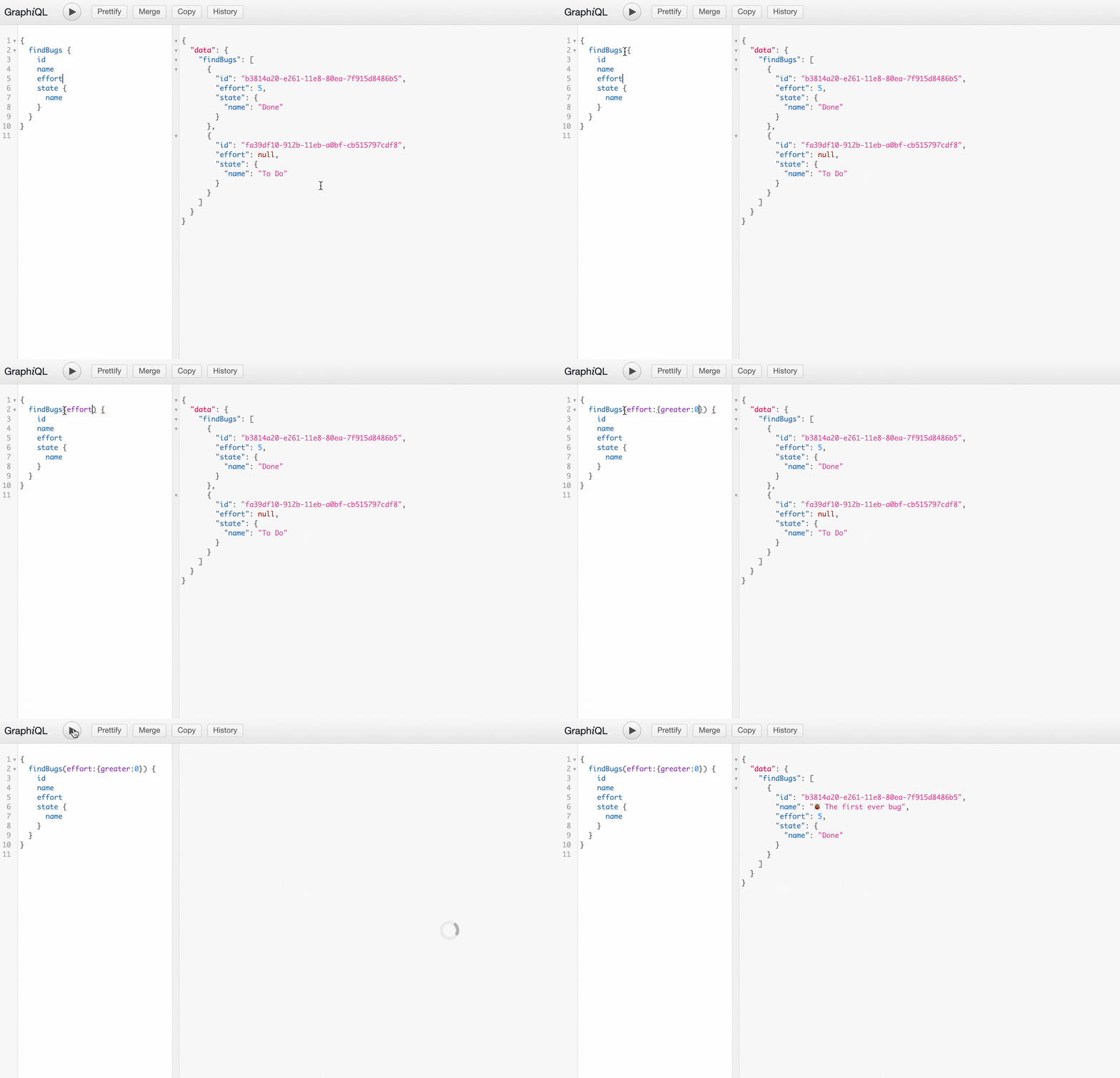
There is a variety of filtering capabilities for each database including filtering by one-to-one fields or inner lists content. Filters can be applied by providing filtering arguments for find queries.
The filter operators available can be discovered through autocomplete while creating a query in GraphiQL.
Curl:
```bash theme={null}
curl -X POST https://YOUR_ACCOUNT.fibery.io/api/graphql/space/Software_Development \
-H "Authorization: Token YOUR_TOKEN" \
-H "Content-Type: application/json" \
-d '{"query":"{findBugs{id,name,state{name}}}"}'
```
JavaScript:
```javascript theme={null}
import {config} from 'dotenv';
config();
import fetch from 'node-fetch';
const YOUR_SPACE_ENDPOINT = `https://YOUR_ACCOUNT.fibery.io/api/graphql/space/Software_Development`;
const YOUR_TOKEN = process.env[`YOUR_TOKEN`];
(async () => {
const query = `{findBugs{id,name,state{name}}}`;
const response = await fetch(YOUR_SPACE_ENDPOINT, {
method: 'POST',
body: JSON.stringify({query}),
headers: {
'Content-Type': `application/json`,
'Authorization': `Token ${YOUR_TOKEN}`,
}
});
const result = await response.json();
console.log(JSON.stringify(result));
})();
```
Output
```json theme={null}
{
"data": {
"findBugs": [
{
"id": "b3814a20-e261-11e8-80ea-7f915d8486b5",
"name": "🐞 The first ever bug",
"state": {
"name": "Done"
}
},
{
"id": "fa39df10-912b-11eb-a0bf-cb515797cdf8",
"name": "Nasty bug from the trenches",
"state": {
"name": "To Do"
}
}
]
}
}
```
## Filtering
There is a variety of filtering capabilities for each database including filtering by one-to-one fields or inner lists content. Filters can be applied by providing filtering arguments for find queries.
The filter operators available can be discovered through autocomplete while creating a query in GraphiQL.
 Filtering by native fields
```graphql theme={null}
{
findBugs(
name: {contains: "disaster"}
state: {name: {in: ["Open", "Done"]}}
)
{
id
name
state {
name
}
}
}
```
Filtering by one-to-one fields
Find Open and Done bugs, for example:
```graphql theme={null}
{
findBugs(
state: {name: {in: ["Open", "Done"]}}
)
{
id
name
state {
name
}
}
}
```
Find High priority bugs:
```graphql theme={null}
{
findBugs(orderBy: {rank: ASC}, priority: {name: {is: "High"}}) {
name,
}
}
```
Filtering by many fields (AND statement is used)
```graphql theme={null}
{
findBugs(
release: {startDate: {isNull: false}, name: {contains: "1.0"}},
state: {name: {in: ["Open", "Done"]}}
)
{
id
name
release {
startDate
name
}
state {
name
}
}
}
```
**String** filtering operators
```javascript theme={null}
is: String
isNot: String
contains: String
notContains: String
greater: String
greaterOrEquals: String
less: String
lessOrEquals: String
in: [String]
notIn: [String]
isNull: Boolean
```
**Int** filtering operators
```javascript theme={null}
is: Int
isNot: Int
greater: Int
greaterOrEquals: Int
less: Int
lessOrEquals: Int
in: [Int]
notIn: [Int]
isNull: Boolean
```
**Float** filtering operators
```javascript theme={null}
is: Float
isNot: Float
greater: Float
greaterOrEquals: Float
less: Float
lessOrEquals: Float
in: [Float]
notIn: [Float]
isNull: Boolean
```
**Boolean** filtering operators
```javascript theme={null}
is: Boolean
isNull: Boolean
```
**ID** filtering operators
```javascript theme={null}
is: ID
isNot: ID
in: [ID]
notIn: [ID]
isNull: Boolean
```
### **Filtering by inner lists**
The database can be filtered by content of inner list, but it is a bit different from filtering by one-to-one or native fields. For example the query to the left allows to find releases which contains bugs in "Open" state or with effort greater than 0.
The following operators can be used for filtering database by inner list:
```javascript theme={null}
isEmpty: Boolean
contains: [InnerListDbFilter] // AND statement
containsAny: [InnerListDbFilter] // OR statement
notContains: [InnerListDbFilter] // AND statement
notContainsAny: [InnerListDbFilter] // OR statement
```
Filtering by inner lists:
```graphql theme={null}
{
findReleases(
bugs: {
containsAny: [
{state: {name: {is: "Open"}}}
{effort: {greater: 0}}
]
})
{
name
bugs {
name
state {
name
}
}
}
}
```
### **Filtering inner lists**
The inner list of database can be filtered in the same way the database filtered. For example if you want to show only "To Do" bugs for releases:
Sample of filtering inner list
```graphql theme={null}
{
findReleases
{
name
bugs(state: {name: {is: "To Do"}}) {
name
state {
name
}
}
}
}
```
## **Sorting**
The database or content of inner lists of the database can be sorted using `orderBy` argument which can be applied for native fields or one-to-one properties.
```graphql theme={null}
{
findReleases(
bugs: {isEmpty: false}
orderBy: {
releaseDate: DESC
}
)
{
name
releaseDate
bugs(
orderBy: {
name: ASC
createdBy: {email: ASC}
}
)
{
name
state {
name
}
}
}
}
```
## **Rich fields and comments**
You can download content of rich text fields or comments in four formats: `jsonString`, `text`, `md`, `html`.
```graphql theme={null}
{
findBugs {
name
stepsToReproduce {
text
}
comments {
md
}
}
}
```
Output
```json theme={null}
{
"data": {
"findBugs": [
{
"name": "🐞 The first ever bug",
"stepsToReproduce": {
"text": "Open up the Mark II\n\n\nCheck all the relays one-by-one\n\n\nFind a little naughty moth"
},
"comments": [
{
"md": "Please fix ASAP"
}
]
}
]
}
}
```
## **File fields**
You can query for public file url which will be valid for 60 minutes using `url`
```graphql theme={null}
{
findBugs {
name
files {
name,
url,
urlExpiresAt
}
}
}
```
Output
```json theme={null}
{
"data": {
"findBugs": [
{
"name": "🐞 The first ever bug",
"files": [
{
"name": "Screenshot 2025-12-29 at 13.31.48.png",
"url": "https://d1....",
"urlExpiresAt": "2026-01-22T14:19:02.571Z"
}
]
}
]
}
}
```
## **Paging and limits**
By default, find database query returns 100 records. The default can be changed by setting `limit` argument. Use `offset` argument to retrieve next page if the current page contains 100 records (or equals to limit value).
Retrieve first page (limit is 3)
```graphql theme={null}
{
findBugs(limit: 3) {
name
}
}
```
Retrieve second page (limit: 3, offset: 3). Retrieve only if first page size equals to 3
```graphql theme={null}
{
findBugs(limit: 3, offset: 3) {
name
}
}
```
## **Aliases**
GraphQL aliases can be used for find query if you would like to get separated results or as alternative to OR statement.
Using aliases:
```graphql theme={null}
{
todo: findBugs(state: {name: {is: "To Do"}}) {
name
state {
name
}
}
done: findBugs(state: {name: {is: "Done"}}) {
name
state {
name
}
}
}
```
Output:
```json theme={null}
{
"data": {
"todo": [
{
"name": "Nasty bug from the trenches",
"state": {
"name": "To Do"
}
}
],
"done": [
{
"name": "🐞 The first ever bug",
"state": {
"name": "Done"
}
}
]
}
}
```
Filtering by native fields
```graphql theme={null}
{
findBugs(
name: {contains: "disaster"}
state: {name: {in: ["Open", "Done"]}}
)
{
id
name
state {
name
}
}
}
```
Filtering by one-to-one fields
Find Open and Done bugs, for example:
```graphql theme={null}
{
findBugs(
state: {name: {in: ["Open", "Done"]}}
)
{
id
name
state {
name
}
}
}
```
Find High priority bugs:
```graphql theme={null}
{
findBugs(orderBy: {rank: ASC}, priority: {name: {is: "High"}}) {
name,
}
}
```
Filtering by many fields (AND statement is used)
```graphql theme={null}
{
findBugs(
release: {startDate: {isNull: false}, name: {contains: "1.0"}},
state: {name: {in: ["Open", "Done"]}}
)
{
id
name
release {
startDate
name
}
state {
name
}
}
}
```
**String** filtering operators
```javascript theme={null}
is: String
isNot: String
contains: String
notContains: String
greater: String
greaterOrEquals: String
less: String
lessOrEquals: String
in: [String]
notIn: [String]
isNull: Boolean
```
**Int** filtering operators
```javascript theme={null}
is: Int
isNot: Int
greater: Int
greaterOrEquals: Int
less: Int
lessOrEquals: Int
in: [Int]
notIn: [Int]
isNull: Boolean
```
**Float** filtering operators
```javascript theme={null}
is: Float
isNot: Float
greater: Float
greaterOrEquals: Float
less: Float
lessOrEquals: Float
in: [Float]
notIn: [Float]
isNull: Boolean
```
**Boolean** filtering operators
```javascript theme={null}
is: Boolean
isNull: Boolean
```
**ID** filtering operators
```javascript theme={null}
is: ID
isNot: ID
in: [ID]
notIn: [ID]
isNull: Boolean
```
### **Filtering by inner lists**
The database can be filtered by content of inner list, but it is a bit different from filtering by one-to-one or native fields. For example the query to the left allows to find releases which contains bugs in "Open" state or with effort greater than 0.
The following operators can be used for filtering database by inner list:
```javascript theme={null}
isEmpty: Boolean
contains: [InnerListDbFilter] // AND statement
containsAny: [InnerListDbFilter] // OR statement
notContains: [InnerListDbFilter] // AND statement
notContainsAny: [InnerListDbFilter] // OR statement
```
Filtering by inner lists:
```graphql theme={null}
{
findReleases(
bugs: {
containsAny: [
{state: {name: {is: "Open"}}}
{effort: {greater: 0}}
]
})
{
name
bugs {
name
state {
name
}
}
}
}
```
### **Filtering inner lists**
The inner list of database can be filtered in the same way the database filtered. For example if you want to show only "To Do" bugs for releases:
Sample of filtering inner list
```graphql theme={null}
{
findReleases
{
name
bugs(state: {name: {is: "To Do"}}) {
name
state {
name
}
}
}
}
```
## **Sorting**
The database or content of inner lists of the database can be sorted using `orderBy` argument which can be applied for native fields or one-to-one properties.
```graphql theme={null}
{
findReleases(
bugs: {isEmpty: false}
orderBy: {
releaseDate: DESC
}
)
{
name
releaseDate
bugs(
orderBy: {
name: ASC
createdBy: {email: ASC}
}
)
{
name
state {
name
}
}
}
}
```
## **Rich fields and comments**
You can download content of rich text fields or comments in four formats: `jsonString`, `text`, `md`, `html`.
```graphql theme={null}
{
findBugs {
name
stepsToReproduce {
text
}
comments {
md
}
}
}
```
Output
```json theme={null}
{
"data": {
"findBugs": [
{
"name": "🐞 The first ever bug",
"stepsToReproduce": {
"text": "Open up the Mark II\n\n\nCheck all the relays one-by-one\n\n\nFind a little naughty moth"
},
"comments": [
{
"md": "Please fix ASAP"
}
]
}
]
}
}
```
## **File fields**
You can query for public file url which will be valid for 60 minutes using `url`
```graphql theme={null}
{
findBugs {
name
files {
name,
url,
urlExpiresAt
}
}
}
```
Output
```json theme={null}
{
"data": {
"findBugs": [
{
"name": "🐞 The first ever bug",
"files": [
{
"name": "Screenshot 2025-12-29 at 13.31.48.png",
"url": "https://d1....",
"urlExpiresAt": "2026-01-22T14:19:02.571Z"
}
]
}
]
}
}
```
## **Paging and limits**
By default, find database query returns 100 records. The default can be changed by setting `limit` argument. Use `offset` argument to retrieve next page if the current page contains 100 records (or equals to limit value).
Retrieve first page (limit is 3)
```graphql theme={null}
{
findBugs(limit: 3) {
name
}
}
```
Retrieve second page (limit: 3, offset: 3). Retrieve only if first page size equals to 3
```graphql theme={null}
{
findBugs(limit: 3, offset: 3) {
name
}
}
```
## **Aliases**
GraphQL aliases can be used for find query if you would like to get separated results or as alternative to OR statement.
Using aliases:
```graphql theme={null}
{
todo: findBugs(state: {name: {is: "To Do"}}) {
name
state {
name
}
}
done: findBugs(state: {name: {is: "Done"}}) {
name
state {
name
}
}
}
```
Output:
```json theme={null}
{
"data": {
"todo": [
{
"name": "Nasty bug from the trenches",
"state": {
"name": "To Do"
}
}
],
"done": [
{
"name": "🐞 The first ever bug",
"state": {
"name": "Done"
}
}
]
}
}
```