> ## Documentation Index
> Fetch the complete documentation index at: https://developers.fibery.com/llms.txt
> Use this file to discover all available pages before exploring further.
# Files
> Learn how to upload and manage files using the Fibery API.
Working with Files is different from other scenarios. To upload or download a File, use `api/files` endpoint instead of the usual `api/commands`.
When uploading a File, Fibery does two things:
1. Saves the File to Storage and gets File's `fibery/secret`.
2. Creates an Entity in the `fibery/file` Database with the `fibery/secret` from the previous step and gets `fibery/id`.
When working with Storage (ex. downloading a File) use `fibery/secret`. For actions inside Fibery (ex. attaching a File to an Entity) use `fibery/id`:
Parent Entity --- (`fibery/id`) ---> File Entity --- (`fibery/secret`) ---> File in Storage\
`fibery/file` Database
| Field name | Field type | Example |
| --------------------- | ------------- | ------------------------------------ |
| `fibery/id` | `fibery/uuid` | c5bc1ec0-997e-11e9-bcec-8fb5f642f8a5 |
| `fibery/secret` | `fibery/uuid` | c5815fb0-997e-11e9-bcec-8fb5f642f8a5 |
| `fibery/name` | `fibery/text` | "vogon-ship.jpg" |
| `fibery/content-type` | `fibery/text` | "image/jpeg" |
## Upload File
Upload a locally stored File and get:
* `fibery/id` to attach the File to an Entity;
* `fibery/secret` to download the File.
Upload an image from a Windows PC:
```javascript JavaScript theme={null}
const fs = require('node:fs');
const file = new Blob(
[fs.readFileSync('C:\\Users\\Trillian\\Pictures\\virat-kohli.jpg')],
{ type: 'image/jpeg' }
);
const formData = new FormData();
formData.append('file', file, 'virat-kohli.jpg');
const response = await fetch('https://YOUR_ACCOUNT.fibery.io/api/files', {
method: 'POST',
headers: { 'Authorization': 'Token YOUR_TOKEN' },
body: formData
});
const data = await response.json();
```
```bash cURL theme={null}
curl -X POST https://YOUR_ACCOUNT.fibery.io/api/files \
-H 'Authorization: Token YOUR_TOKEN' \
-F 'file=@C:\Users\Trillian\Pictures\virat-kohli.jpg'
```
Result:
```json theme={null}
{
"fibery/id": "c5bc1ec0-997e-11e9-bcec-8fb5f642f8a5",
"fibery/name": "virat-kohli.jpg",
"fibery/content-type": "image/jpeg",
"fibery/secret": "c5815fb0-997e-11e9-bcec-8fb5f642f8a5",
"fibery/content-length": 312456,
"fibery/rank": 0
}
```
## Upload File from the web
Upload a file from url and get:
* `fibery/id` to attach the File to an Entity;
* `fibery/secret` to download the File.
| parameter | optional? | type | Example |
| --------- | --------- | -------------- | -------------------------------------------------------------------------------------- |
| `url` | required | `string` | "[https://example.com/files/attachment.pdf](https://example.com/files/attachment.pdf)" |
| `name` | optional | `string` | "my file.pdf" |
| `method` | optional | `GET\POST\...` | "POST" , defaults to "GET" |
| `headers` | optional | `{}` | \{ "auth header": "auth key for 3rd party system" } |
Upload an image from pixabay:
```javascript JavaScript theme={null}
const response = await fetch('https://YOUR_ACCOUNT.fibery.io/api/files/from-url', {
method: 'POST',
headers: {
'Authorization': 'Token YOUR_TOKEN',
'Content-Type': 'application/json'
},
body: JSON.stringify({
url: 'https://cdn.pixabay.com/photo/2016/03/28/10/05/kitten-1285341_1280.jpg',
method: 'GET',
name: 'img.jpg',
headers: {
'auth header': 'auth key for url specified'
}
})
});
const data = await response.json();
```
```bash cURL theme={null}
curl -X POST https://YOUR_ACCOUNT.fibery.io/api/files/from-url \
-H 'Authorization: Token YOUR_TOKEN' \
-H 'Content-Type: application/json' \
-d '{
"url": "https://cdn.pixabay.com/photo/2016/03/28/10/05/kitten-1285341_1280.jpg",
"method": "GET",
"name": "img.jpg",
"headers": {
"auth header": "auth key for url specified"
}
}'
```
Result:
```json theme={null}
{
"fibery/id": "d5bc1ec0-997e-11e9-bcec-8fb5f642f8a5",
"fibery/name": "img.jpg",
"fibery/content-type": "image/jpeg",
"fibery/secret": "f5815fb0-997e-11e9-bcec-8fb5f642f8a5",
"fibery/content-length": 158948,
"fibery/rank": 0
}
```
## **Download File**
Download a File by providing `fibery/secret`.
```javascript JavaScript theme={null}
const fs = require('node:fs');
const response = await fetch(
'https://YOUR_ACCOUNT.fibery.io/api/files/c5815fb0-997e-11e9-bcec-8fb5f642f8a5',
{ headers: { 'Authorization': 'Token YOUR_TOKEN' } }
);
const buffer = Buffer.from(await response.arrayBuffer());
fs.writeFileSync('./virat.jpg', buffer);
```
```bash cURL theme={null}
curl -L -X GET https://YOUR_ACCOUNT.fibery.io/api/files/c5815fb0-997e-11e9-bcec-8fb5f642f8a5 \
-H 'Authorization: Token YOUR_TOKEN' \
-o ./virat.jpg
```
Note: there is no place on UI where you can find any arbitrary file. You can download it by URL above (or preview by browser if file format allows it).\
To view it file on UI one must place it in the Rich Text or Document or into Files extension for some Entity.
## Get temporary public File Url
You can get a signed url which is valid for 60 minutes by calling `/sign-urls`
| parameter | optional? | type | Example |
| --------- | --------- | ---------- | ----------------------------------------- |
| `secrets` | required | `string[]` | \["c5815fb0-997e-11e9-bcec-8fb5f642f8a5"] |
```javascript JavaScript theme={null}
const response = await fetch('https://YOUR_ACCOUNT.fibery.io/api/files/sign-urls', {
method: 'POST',
headers: {
'Authorization': 'Token YOUR_TOKEN',
'Content-Type': 'application/json'
},
body: JSON.stringify({
secrets: ['c5815fb0-997e-11e9-bcec-8fb5f642f8a5']
})
});
const data = await response.json();
```
```bash cURL theme={null}
curl -X POST https://YOUR_ACCOUNT.fibery.io/api/files/sign-urls \
-H 'Authorization: Token YOUR_TOKEN' \
-H 'Content-Type: application/json' \
-d '{
"secrets": ["c5815fb0-997e-11e9-bcec-8fb5f642f8a5"]
}'
```
Result:
```json theme={null}
{
"items": [
{
"secret": "c5815fb0-997e-11e9-bcec-8fb5f642f8a5",
"url": "https://....",
"expiresAt": "2026-01-13T20:48:37.524Z"
}
]
}
```
## **Attach File to Entity**
Before attaching a File, make sure that you have a Files field added for the Entity's Database:
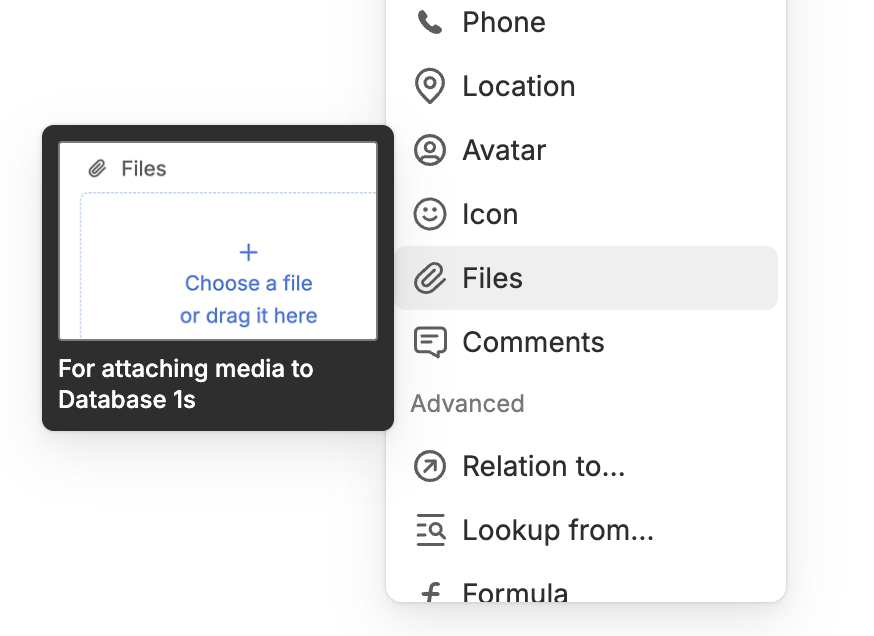
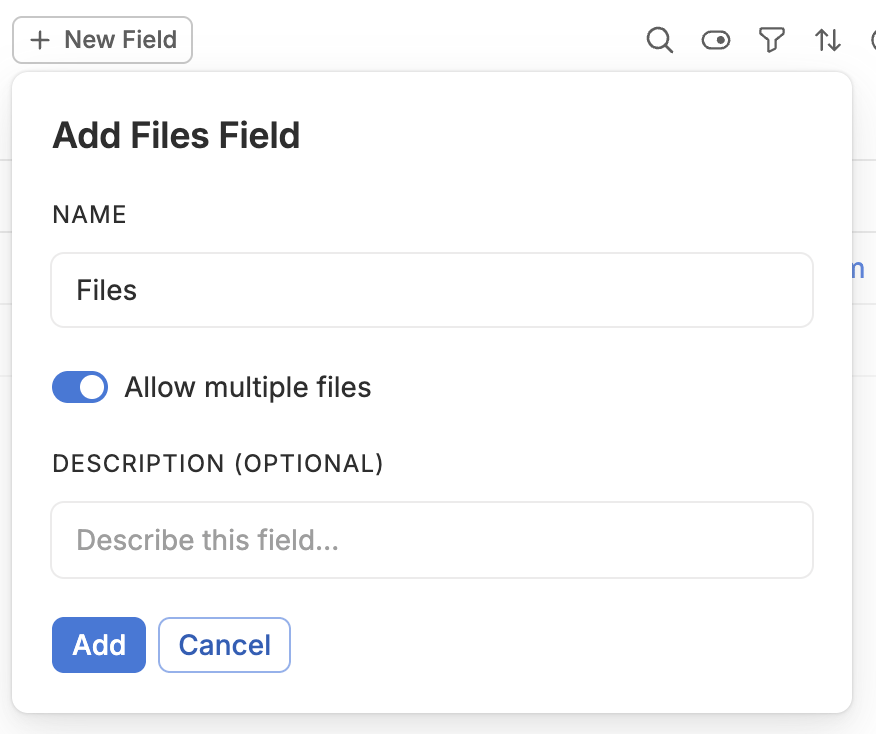 Suppose you've added a Files field like it shown on image above. It creates Files Field as an entity collection Field called `/Files`. Attach and remove Files the same way you update any other entity collection Field. In case you disable `Allow multiple files` option the field is created as a single file field. In examples bellow we're considering that you're working with files collection, please consult your [Query entities](/guides/http-api/query-entities) guide to query single file field data.
Attach a picture to a Player's profile:
```javascript JavaScript theme={null}
const response = await fetch('https://YOUR_ACCOUNT.fibery.io/api/commands', {
method: 'POST',
headers: {
'Authorization': 'Token YOUR_TOKEN',
'Content-Type': 'application/json'
},
body: JSON.stringify({
command: 'fibery.entity/add-collection-items',
args: {
type: 'Cricket/Player',
field: 'Cricket/Photos',
entity: { 'fibery/id': '20f9b920-9752-11e9-81b9-4363f716f666' },
items: [
{ 'fibery/id': 'c5bc1ec0-997e-11e9-bcec-8fb5f642f8a5' }
]
}
})
});
const data = await response.json();
```
```bash cURL theme={null}
curl -X POST https://YOUR_ACCOUNT.fibery.io/api/commands \
-H 'Authorization: Token YOUR_TOKEN' \
-H 'Content-Type: application/json' \
-d '
{
"command": "fibery.entity/add-collection-items",
"args": {
"type": "Cricket/Player",
"field": "Cricket/Photos",
"entity": { "fibery/id": "20f9b920-9752-11e9-81b9-4363f716f666" },
"items": [
{ "fibery/id": "c5bc1ec0-997e-11e9-bcec-8fb5f642f8a5" }
]
}
}
'
```
Response:
```json theme={null}
{
"success": true,
"result": "ok"
}
```
## **Download attachments**
To download Entity's attached Files:
1. Get the Files `fibery/secret`;
2. Download each File using `fibery/secret`.
Get attached Files `fibery/secret` for a particular Player Entity:
```javascript JavaScript theme={null}
const response = await fetch('https://YOUR_ACCOUNT.fibery.io/api/commands', {
method: 'POST',
headers: {
'Authorization': 'Token YOUR_TOKEN',
'Content-Type': 'application/json'
},
body: JSON.stringify({
command: 'fibery.entity/query',
args: {
query: {
'q/from': 'Cricket/Player',
'q/select': [
'fibery/id',
{ 'Cricket/Photos': {
'q/select': ['fibery/secret'],
'q/limit': 100
}
}
],
'q/where': ['=', ['fibery/id'], '$entity-id'],
'q/limit': 1
},
params: { '$entity-id': '20f9b920-9752-11e9-81b9-4363f716f666' }
}
})
});
const data = await response.json();
```
```bash cURL theme={null}
curl -X POST https://YOUR_ACCOUNT.fibery.io/api/commands \
-H 'Authorization: Token YOUR_TOKEN' \
-H 'Content-Type: application/json' \
-d '
{
"command": "fibery.entity/query",
"args": {
"query": {
"q/from": "Cricket/Player",
"q/select": [
"fibery/id",
{ "Cricket/Photos": {
"q/select": ["fibery/secret"],
"q/limit": 100
} }
],
"q/where": ["=", ["fibery/id"], "$entity-id"],
"q/limit": 1
},
"params": {"$entity-id": "20f9b920-9752-11e9-81b9-4363f716f666"}
}
}
'
```
Grab the secrets:
```json theme={null}
{
"success": true,
"result": [
{
"fibery/id": "20f9b920-9752-11e9-81b9-4363f716f666",
"Cricket/Photos": [
{
"fibery/secret": "a71a7f30-9991-11e9-b8d4-8aba22381101"
},
{
"fibery/secret": "c5815fb0-997e-11e9-bcec-8fb5f642f8a5"
}
]
}
]
}
```
Download Files using these secrets:
```javascript JavaScript theme={null}
const fs = require('node:fs');
const secrets = [
'a71a7f30-9991-11e9-b8d4-8aba22381101',
'c5815fb0-997e-11e9-bcec-8fb5f642f8a5'
];
await Promise.all(secrets.map(async (secret) => {
const response = await fetch(
`https://YOUR_ACCOUNT.fibery.io/api/files/${secret}`,
{ headers: { 'Authorization': 'Token YOUR_TOKEN' } }
);
const buffer = Buffer.from(await response.arrayBuffer());
fs.writeFileSync(`./${secret}.bin`, buffer);
}));
```
```bash cURL theme={null}
curl -L -X GET https://YOUR_ACCOUNT.fibery.io/api/files/a71a7f30-9991-11e9-b8d4-8aba22381101 \
-H 'Authorization: Token YOUR_TOKEN' \
-o ./a71a7f30.bin
curl -L -X GET https://YOUR_ACCOUNT.fibery.io/api/files/c5815fb0-997e-11e9-bcec-8fb5f642f8a5 \
-H 'Authorization: Token YOUR_TOKEN' \
-o ./c5815fb0.bin
```
### FAQ
#### How to Upload Images via API From External Sources
```javascript theme={null}
await fetch('/api/files/from-url', {
method: "post",
headers: {
'Content-Type': "application/json; charset=utf-8"
},
body: JSON.stringify({url: "file-url", name: "file-name", id: "optional UUID of file being created"}),
});
```
Suppose you've added a Files field like it shown on image above. It creates Files Field as an entity collection Field called `/Files`. Attach and remove Files the same way you update any other entity collection Field. In case you disable `Allow multiple files` option the field is created as a single file field. In examples bellow we're considering that you're working with files collection, please consult your [Query entities](/guides/http-api/query-entities) guide to query single file field data.
Attach a picture to a Player's profile:
```javascript JavaScript theme={null}
const response = await fetch('https://YOUR_ACCOUNT.fibery.io/api/commands', {
method: 'POST',
headers: {
'Authorization': 'Token YOUR_TOKEN',
'Content-Type': 'application/json'
},
body: JSON.stringify({
command: 'fibery.entity/add-collection-items',
args: {
type: 'Cricket/Player',
field: 'Cricket/Photos',
entity: { 'fibery/id': '20f9b920-9752-11e9-81b9-4363f716f666' },
items: [
{ 'fibery/id': 'c5bc1ec0-997e-11e9-bcec-8fb5f642f8a5' }
]
}
})
});
const data = await response.json();
```
```bash cURL theme={null}
curl -X POST https://YOUR_ACCOUNT.fibery.io/api/commands \
-H 'Authorization: Token YOUR_TOKEN' \
-H 'Content-Type: application/json' \
-d '
{
"command": "fibery.entity/add-collection-items",
"args": {
"type": "Cricket/Player",
"field": "Cricket/Photos",
"entity": { "fibery/id": "20f9b920-9752-11e9-81b9-4363f716f666" },
"items": [
{ "fibery/id": "c5bc1ec0-997e-11e9-bcec-8fb5f642f8a5" }
]
}
}
'
```
Response:
```json theme={null}
{
"success": true,
"result": "ok"
}
```
## **Download attachments**
To download Entity's attached Files:
1. Get the Files `fibery/secret`;
2. Download each File using `fibery/secret`.
Get attached Files `fibery/secret` for a particular Player Entity:
```javascript JavaScript theme={null}
const response = await fetch('https://YOUR_ACCOUNT.fibery.io/api/commands', {
method: 'POST',
headers: {
'Authorization': 'Token YOUR_TOKEN',
'Content-Type': 'application/json'
},
body: JSON.stringify({
command: 'fibery.entity/query',
args: {
query: {
'q/from': 'Cricket/Player',
'q/select': [
'fibery/id',
{ 'Cricket/Photos': {
'q/select': ['fibery/secret'],
'q/limit': 100
}
}
],
'q/where': ['=', ['fibery/id'], '$entity-id'],
'q/limit': 1
},
params: { '$entity-id': '20f9b920-9752-11e9-81b9-4363f716f666' }
}
})
});
const data = await response.json();
```
```bash cURL theme={null}
curl -X POST https://YOUR_ACCOUNT.fibery.io/api/commands \
-H 'Authorization: Token YOUR_TOKEN' \
-H 'Content-Type: application/json' \
-d '
{
"command": "fibery.entity/query",
"args": {
"query": {
"q/from": "Cricket/Player",
"q/select": [
"fibery/id",
{ "Cricket/Photos": {
"q/select": ["fibery/secret"],
"q/limit": 100
} }
],
"q/where": ["=", ["fibery/id"], "$entity-id"],
"q/limit": 1
},
"params": {"$entity-id": "20f9b920-9752-11e9-81b9-4363f716f666"}
}
}
'
```
Grab the secrets:
```json theme={null}
{
"success": true,
"result": [
{
"fibery/id": "20f9b920-9752-11e9-81b9-4363f716f666",
"Cricket/Photos": [
{
"fibery/secret": "a71a7f30-9991-11e9-b8d4-8aba22381101"
},
{
"fibery/secret": "c5815fb0-997e-11e9-bcec-8fb5f642f8a5"
}
]
}
]
}
```
Download Files using these secrets:
```javascript JavaScript theme={null}
const fs = require('node:fs');
const secrets = [
'a71a7f30-9991-11e9-b8d4-8aba22381101',
'c5815fb0-997e-11e9-bcec-8fb5f642f8a5'
];
await Promise.all(secrets.map(async (secret) => {
const response = await fetch(
`https://YOUR_ACCOUNT.fibery.io/api/files/${secret}`,
{ headers: { 'Authorization': 'Token YOUR_TOKEN' } }
);
const buffer = Buffer.from(await response.arrayBuffer());
fs.writeFileSync(`./${secret}.bin`, buffer);
}));
```
```bash cURL theme={null}
curl -L -X GET https://YOUR_ACCOUNT.fibery.io/api/files/a71a7f30-9991-11e9-b8d4-8aba22381101 \
-H 'Authorization: Token YOUR_TOKEN' \
-o ./a71a7f30.bin
curl -L -X GET https://YOUR_ACCOUNT.fibery.io/api/files/c5815fb0-997e-11e9-bcec-8fb5f642f8a5 \
-H 'Authorization: Token YOUR_TOKEN' \
-o ./c5815fb0.bin
```
### FAQ
#### How to Upload Images via API From External Sources
```javascript theme={null}
await fetch('/api/files/from-url', {
method: "post",
headers: {
'Content-Type': "application/json; charset=utf-8"
},
body: JSON.stringify({url: "file-url", name: "file-name", id: "optional UUID of file being created"}),
});
```