> ## Documentation Index
> Fetch the complete documentation index at: https://developers.fibery.com/llms.txt
> Use this file to discover all available pages before exploring further.
# Integration Filters
> Declare filters in a custom integration schema.
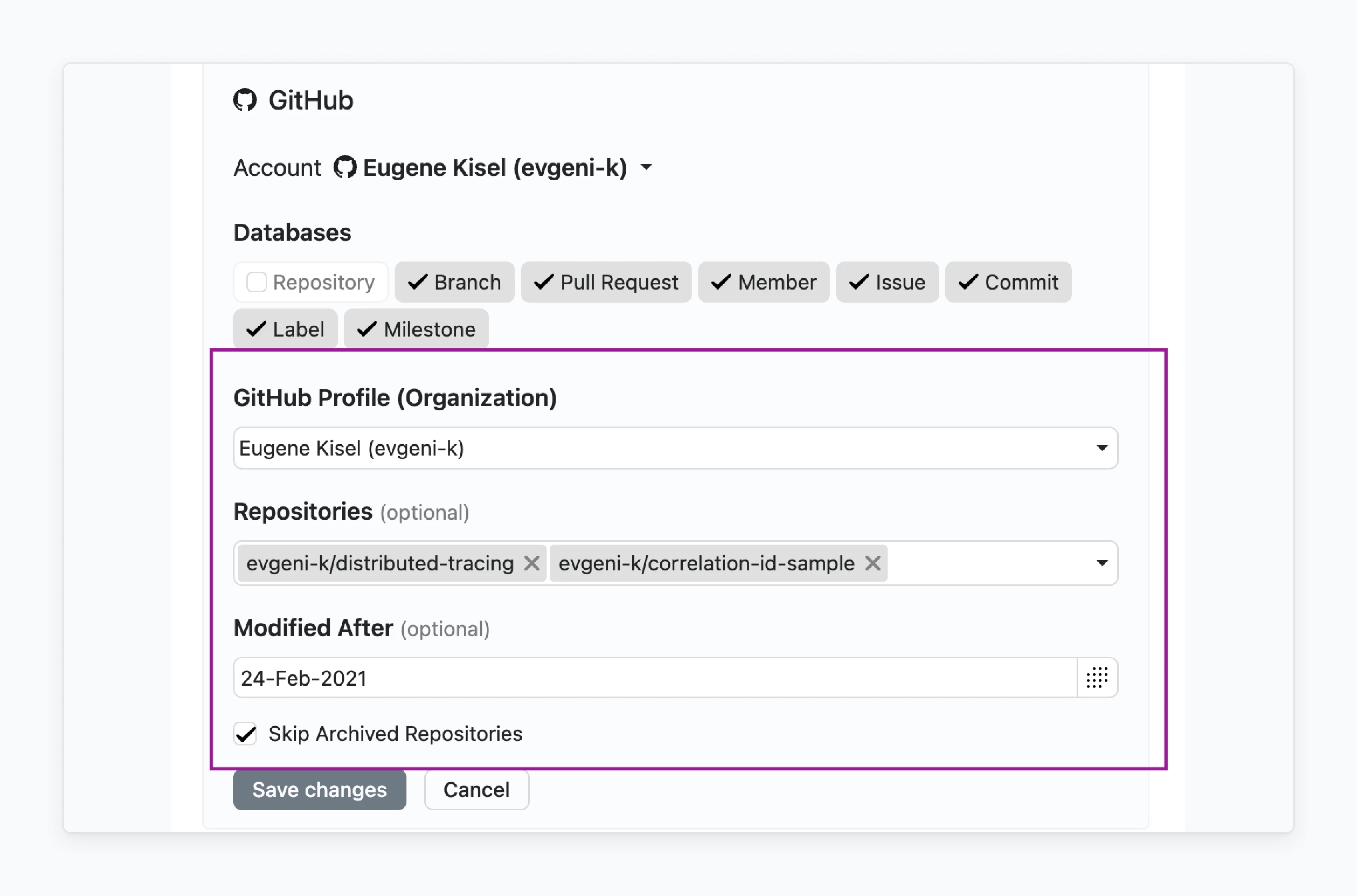
In Fibery, you can configure a set of Filters for integration with other applications. This is useful when you want to reduce the amount of data for synchronization, for example:
* Data created or modified after the certain date.
* Data from certain repositories, channels, groups.
* Deleted or archived data.
* Etc.
Filter configuration includes following common Fields across different Filter types:
| Name | Type | Description | Required |
| -------------- | --------- | ------------------------------------------------------------------------------------------ | :----------------------------------------: |
| `id` | `text` | Unique identifier | |
| `title` | `text` | Display name | |
| `optional` | `boolean` | Indicates that user may leave Filter unset | |
| `type` | `text` | Filter type (a list of supported Filter types and their customizations can be found below) | |
| `secured` | `boolean` | Secured Filter values are not available for change by non-owner | |
| `defaultValue` | `unknown` | Filter default value | |
### Filter configuration sample
```json theme={null}
[
{
"id": "channels",
"title": "Channels",
"datalist": true,
"optional": false,
"secured": true,
"type": "multidropdown"
},
{
"id": "oldest",
"title": "Oldest Message",
"optional": false,
"type": "datebox",
"datalist": false
},
{
"id": "excludeAppMessages",
"title": "Filter out APP messages",
"optional": true,
"type": "bool",
"defaultValue": false
}
]
```
## Text Filter
Simple text Filter available with `type="text"` :
### Configuration sample
```json theme={null}
{
"id": "text",
"title": "Text",
"type": "text"
}
```
## Number Filter
Simple number Filter available with `type="number"` :
### Configuration sample
```json theme={null}
{
"id": "number",
"title": "Number",
"type": "number"
}
```
## Single Date Filter
Simple single date Filter available with `type="datebox"`:
### Configuration sample
```json theme={null}
{
"id": "oldest",
"title": "Oldest Message",
"optional": false,
"type": "datebox"
}
```
## Checkbox Filter
Simple `true`/`false` Filter available with `type="bool"`:
### Configuration sample
```json theme={null}
{
"id": "excludeAppMessages",
"title": "Filter out APP messages",
"optional": true,
"type": "bool"
}
```
## Single Select Filter
Filter based on predefined values which is rendered as Single Select. Connector should provide available values via [datalist endpoint](/guides/integrations/rest-endpoints#post-/api/v1/synchronizer/datalist).
Following attributes should be specified:
* `type="list"`
* `datalist=true`
### Configuration sample 1
```json theme={null}
{
"id": "group",
"title": "Group",
"datalist": true,
"type": "list"
}
```
Also, it's possible to configure this Filter as a datalist dependent from another datalist (e.g., user should first select organization and only afterwards repository). It can be achieved by specifying `datalist_requires` attribute where value is an array of ID of another `datalists` .
### Configuration sample 2
```json theme={null}
[
{
"id": "group",
"title": "Group",
"datalist": true,
"type": "list"
},
{
"id": "project",
"title": "Project",
"datalist": true,
"type": "list",
"datalist_requires": [
"group"
]
}
]
```
## Multi Select Filter
This Filter is based on predefined values which are rendered as Multi Select Field. The connector should provide available values via [datalist endpoint](/guides/integrations/rest-endpoints#post-/api/v1/synchronizer/datalist).
Following attributes should be specified:
* `type="multidropdown"`
* `datalist=true`
### Configuration sample 1
```json theme={null}
{
"id": "groups",
"title": "Groups",
"datalist": true,
"type": "multidropdown"
}
```
Also, it's possible to configure this Filter as a datalist dependent from another datalist (e.g., user should first select organization and only afterwards repository). It can be achieved by specifying `datalist_requires` attribute where value is an array of ID of another `datalists`
### Configuration sample 2
```json theme={null}
[
{
"id": "group",
"title": "Group",
"datalist": true,
"type": "list"
},
{
"id": "projects",
"title": "Projects",
"datalist": true,
"type": "multidropdown",
"datalist_requires": [
"group"
]
}
]
```
If you haven't found applicable Filter, please contact us in the support chat or in [the community](https://community.fibery.io/ "https://community.fibery.io/").
 Filter configuration includes following common Fields across different Filter types:
| Name | Type | Description | Required |
| -------------- | --------- | ------------------------------------------------------------------------------------------ | :----------------------------------------: |
| `id` | `text` | Unique identifier | |
| `title` | `text` | Display name | |
| `optional` | `boolean` | Indicates that user may leave Filter unset | |
| `type` | `text` | Filter type (a list of supported Filter types and their customizations can be found below) | |
| `secured` | `boolean` | Secured Filter values are not available for change by non-owner | |
| `defaultValue` | `unknown` | Filter default value | |
### Filter configuration sample
```json theme={null}
[
{
"id": "channels",
"title": "Channels",
"datalist": true,
"optional": false,
"secured": true,
"type": "multidropdown"
},
{
"id": "oldest",
"title": "Oldest Message",
"optional": false,
"type": "datebox",
"datalist": false
},
{
"id": "excludeAppMessages",
"title": "Filter out APP messages",
"optional": true,
"type": "bool",
"defaultValue": false
}
]
```
## Text Filter
Simple text Filter available with `type="text"` :
Filter configuration includes following common Fields across different Filter types:
| Name | Type | Description | Required |
| -------------- | --------- | ------------------------------------------------------------------------------------------ | :----------------------------------------: |
| `id` | `text` | Unique identifier | |
| `title` | `text` | Display name | |
| `optional` | `boolean` | Indicates that user may leave Filter unset | |
| `type` | `text` | Filter type (a list of supported Filter types and their customizations can be found below) | |
| `secured` | `boolean` | Secured Filter values are not available for change by non-owner | |
| `defaultValue` | `unknown` | Filter default value | |
### Filter configuration sample
```json theme={null}
[
{
"id": "channels",
"title": "Channels",
"datalist": true,
"optional": false,
"secured": true,
"type": "multidropdown"
},
{
"id": "oldest",
"title": "Oldest Message",
"optional": false,
"type": "datebox",
"datalist": false
},
{
"id": "excludeAppMessages",
"title": "Filter out APP messages",
"optional": true,
"type": "bool",
"defaultValue": false
}
]
```
## Text Filter
Simple text Filter available with `type="text"` :
 ### Configuration sample
```json theme={null}
{
"id": "text",
"title": "Text",
"type": "text"
}
```
## Number Filter
Simple number Filter available with `type="number"` :
### Configuration sample
```json theme={null}
{
"id": "text",
"title": "Text",
"type": "text"
}
```
## Number Filter
Simple number Filter available with `type="number"` :
 ### Configuration sample
```json theme={null}
{
"id": "number",
"title": "Number",
"type": "number"
}
```
## Single Date Filter
Simple single date Filter available with `type="datebox"`:
### Configuration sample
```json theme={null}
{
"id": "number",
"title": "Number",
"type": "number"
}
```
## Single Date Filter
Simple single date Filter available with `type="datebox"`:
 ### Configuration sample
```json theme={null}
{
"id": "oldest",
"title": "Oldest Message",
"optional": false,
"type": "datebox"
}
```
## Checkbox Filter
Simple `true`/`false` Filter available with `type="bool"`:
### Configuration sample
```json theme={null}
{
"id": "oldest",
"title": "Oldest Message",
"optional": false,
"type": "datebox"
}
```
## Checkbox Filter
Simple `true`/`false` Filter available with `type="bool"`:
 ### Configuration sample
```json theme={null}
{
"id": "excludeAppMessages",
"title": "Filter out APP messages",
"optional": true,
"type": "bool"
}
```
## Single Select Filter
Filter based on predefined values which is rendered as Single Select. Connector should provide available values via [datalist endpoint](/guides/integrations/rest-endpoints#post-/api/v1/synchronizer/datalist).
Following attributes should be specified:
* `type="list"`
* `datalist=true`
### Configuration sample
```json theme={null}
{
"id": "excludeAppMessages",
"title": "Filter out APP messages",
"optional": true,
"type": "bool"
}
```
## Single Select Filter
Filter based on predefined values which is rendered as Single Select. Connector should provide available values via [datalist endpoint](/guides/integrations/rest-endpoints#post-/api/v1/synchronizer/datalist).
Following attributes should be specified:
* `type="list"`
* `datalist=true`
 ### Configuration sample 1
```json theme={null}
{
"id": "group",
"title": "Group",
"datalist": true,
"type": "list"
}
```
Also, it's possible to configure this Filter as a datalist dependent from another datalist (e.g., user should first select organization and only afterwards repository). It can be achieved by specifying `datalist_requires` attribute where value is an array of ID of another `datalists` .
### Configuration sample 2
```json theme={null}
[
{
"id": "group",
"title": "Group",
"datalist": true,
"type": "list"
},
{
"id": "project",
"title": "Project",
"datalist": true,
"type": "list",
"datalist_requires": [
"group"
]
}
]
```
## Multi Select Filter
This Filter is based on predefined values which are rendered as Multi Select Field. The connector should provide available values via [datalist endpoint](/guides/integrations/rest-endpoints#post-/api/v1/synchronizer/datalist).
Following attributes should be specified:
* `type="multidropdown"`
* `datalist=true`
### Configuration sample 1
```json theme={null}
{
"id": "group",
"title": "Group",
"datalist": true,
"type": "list"
}
```
Also, it's possible to configure this Filter as a datalist dependent from another datalist (e.g., user should first select organization and only afterwards repository). It can be achieved by specifying `datalist_requires` attribute where value is an array of ID of another `datalists` .
### Configuration sample 2
```json theme={null}
[
{
"id": "group",
"title": "Group",
"datalist": true,
"type": "list"
},
{
"id": "project",
"title": "Project",
"datalist": true,
"type": "list",
"datalist_requires": [
"group"
]
}
]
```
## Multi Select Filter
This Filter is based on predefined values which are rendered as Multi Select Field. The connector should provide available values via [datalist endpoint](/guides/integrations/rest-endpoints#post-/api/v1/synchronizer/datalist).
Following attributes should be specified:
* `type="multidropdown"`
* `datalist=true`
 ### Configuration sample 1
```json theme={null}
{
"id": "groups",
"title": "Groups",
"datalist": true,
"type": "multidropdown"
}
```
Also, it's possible to configure this Filter as a datalist dependent from another datalist (e.g., user should first select organization and only afterwards repository). It can be achieved by specifying `datalist_requires` attribute where value is an array of ID of another `datalists`
### Configuration sample 2
```json theme={null}
[
{
"id": "group",
"title": "Group",
"datalist": true,
"type": "list"
},
{
"id": "projects",
"title": "Projects",
"datalist": true,
"type": "multidropdown",
"datalist_requires": [
"group"
]
}
]
```
### Configuration sample 1
```json theme={null}
{
"id": "groups",
"title": "Groups",
"datalist": true,
"type": "multidropdown"
}
```
Also, it's possible to configure this Filter as a datalist dependent from another datalist (e.g., user should first select organization and only afterwards repository). It can be achieved by specifying `datalist_requires` attribute where value is an array of ID of another `datalists`
### Configuration sample 2
```json theme={null}
[
{
"id": "group",
"title": "Group",
"datalist": true,
"type": "list"
},
{
"id": "projects",
"title": "Projects",
"datalist": true,
"type": "multidropdown",
"datalist_requires": [
"group"
]
}
]
```