> ## Documentation Index
> Fetch the complete documentation index at: https://developers.fibery.com/llms.txt
> Use this file to discover all available pages before exploring further.
# Tutorial: Notion sync
> Build a Notion sync integration with OAuth and dynamic schema.
This tutorial is created in order to provide help on creating complex integration app with dynamic data schema, non-primitive data synchronization (for example, files) and oauth2 authentication. The source code (node.js) can be found in [official Fibery repository](https://gitlab.com/fibery-community/notion-app) which contains the implementation of integrating [Notion](https://notion.so/) databases into Fibery databases. Demo databases can be found [here](https://fibery-dev.notion.site/fibery-dev/Demo-cc147e7b2af04d259ccd98444c67b9b4).
## **App Configuration**
Returns the description of the app and possible ways to be authenticated in Notion.
Route in app.js
```javascript theme={null}
app.get(`/`, (req, res) => res.json(connector()));
```
connector.config.js:
```javascript theme={null}
const config = require(`./config`);
const ApiKeyAuthentication = {
description: `Please provide notion authentication`,
name: `Token`,
id: `key`,
fields: [
{
type: `password`,
name: `Integration Token`,
description: `Provide Notion API Integration Token`,
id: `key`,
},
{
type: `link`,
value: `https://www.notion.so/help/create-integrations-with-the-notion-api`,
description: `We need to have your Notion Integration Token to synchronize the data.`,
id: `key-link`,
name: `Read how to create integration, grant access and create token here...`,
},
],
};
const OAuth2 = {
id: 'oauth2',
name: 'OAuth v2 Authentication',
description: 'OAuth v2-based authentication and authorization for access to Notion',
fields: [
{
title: 'callback_uri',
description: 'OAuth post-auth redirect URI',
type: 'oauth',
id: 'callback_uri',
},
],
};
const getAuthenticationStrategies = () => {
return [OAuth2, ApiKeyAuthentication];
};
module.exports.connector = () => ({
id: `notion-app`,
name: `Notion`,
version: config.version,
website: `https://notion.com`,
description: `More than a doc. Or a table. Customize Notion to work the way you do.`,
authentication: getAuthenticationStrategies(),
responsibleFor: {
dataSynchronization: true,
},
sources: [],
});
```
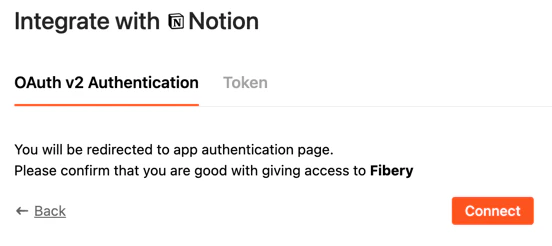
As you see there are two authentication ways are defined:
### **OAuth2**
Hardcoded `"oauth2"` should be used as `id` in case you would like to implement OAuth2 support in integration app.
 ### **Token Authentication**
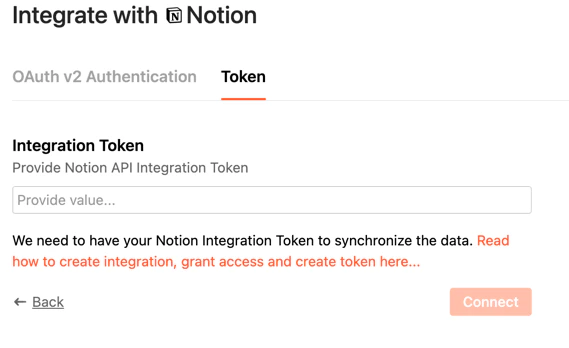
You may use special field `type: "link"` in order to provide url for external resource where the user can get more info. Use `type:"password"` for tokens or other text fields which need to be secured.
### **Token Authentication**
You may use special field `type: "link"` in order to provide url for external resource where the user can get more info. Use `type:"password"` for tokens or other text fields which need to be secured.
 ## **Token Authorization**
The implementation of token authentication is the simplest way to implement. We always used it for testing and development since it is not required UI interaction. The request contains `id` of auth and user provided values. In our case it is `key`. Other fields are appended by system and can be ignored.
Route (app.js):
```javascript theme={null}
app.post(`/validate`, (req, res) => promiseToResponse(res, notion.validate(_.get(req, `body.fields`) || req.body)));
```
Request Body:
```json theme={null}
{
"id": "key",
"fields": {
"app": "620a3c9baec5dd25794fed7a",
"auth": "key",
"owner": "620a3c46cf7154924cf442cb",
"key": "MY TOKEN",
"enabled": true
}
}
```
Notion call (the name of account is returned):
```javascript theme={null}
module.exports.validate = async (account) => {
const client = getNotionClient(account);
const me = await client.users.me();
return {name: me.name}; // response should include the name of user account
};
```
## **OAuth 2**
OAuth 2 is a bit more complex and requires several routes to be implemented. The `POST /oauth2/v1/authorize` endpoint performs the initial setup for OAuth version 2 accounts using `Authorization Code` grant type by generating `redirect_uri` based on received parameters.
Read more in [Custom App: OAuth](/guides/integrations/oauth).
The `POST /oauth2/v1/access_token` endpoint performs the final setup and validation of OAuth version 2 accounts. Information as received from the third party upon redirection to the previously posted `callback_uri` are sent to this endpoint, with other applicable account information, for final setup.
app.js
```javascript theme={null}
app.post('/oauth2/v1/authorize', (req, res) => {
try {
const {callback_uri: callbackUri, state} = req.body;
const redirectUri = oauth.getAuthorizeUrl(callbackUri, state);
res.json({redirect_uri: redirectUri});
} catch (err) {
res.status(401).json({message: `Unauthorized`});
}
});
app.post('/oauth2/v1/access_token', async (req, res) => {
try {
const tokens = await oauth.getAccessToken(req.body.code, req.body.fields.callback_uri);
res.json(tokens);
} catch (err) {
res.status(401).json({message: 'Unauthorized'});
}
});
```
oauth.js
```javascript theme={null}
const got = require(`got`);
const CLIENT_ID = process.env.ENV_CLIENT_ID;
const CLIENT_SECRET = process.env.ENV_CLIENT_SECRET;
module.exports = {
getAuthorizeUrl: (callbackUri, state) => {
const queryParams = {
state,
redirect_uri: callbackUri,
response_type: 'code',
client_id: CLIENT_ID,
owner: `user`,
};
const queryParamsStr = Object.keys(queryParams)
.map((key) => `${encodeURIComponent(key)}=${encodeURIComponent(queryParams[key])}`)
.join(`&`);
return `https://api.notion.com/v1/oauth/authorize?${queryParamsStr}`;
},
getAccessToken: async (code, callbackUri) => {
const tokens = await got.post(`https://api.notion.com/v1/oauth/token`, {
resolveBodyOnly: true,
headers: {
"Authorization": `Basic ${Buffer.from(`${CLIENT_ID}:${CLIENT_SECRET}`).toString('base64')}`,
},
json: {
code,
redirect_uri: callbackUri,
grant_type: `authorization_code`,
},
}).json();
return {access_token: tokens.access_token};
},
};
```
The implementation of oauth is pretty similar for many services and Notion is not exclusion here. Find the code of oauth.js in the right code panel. `access_token` will be passed into `/validate` for validating token in future calls.
## **Synchronizer configuration**
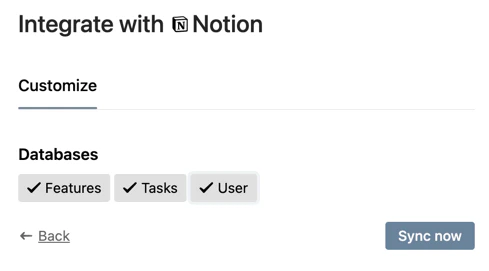
This endpoint returns types which should be synced to Fibery databases. In Notion case it is the list of databases. Static `user` type is added. Check how the configuration response looks like for [Notion Demo](https://fibery-dev.notion.site/fibery-dev/Demo-cc147e7b2af04d259ccd98444c67b9b4).
## **Token Authorization**
The implementation of token authentication is the simplest way to implement. We always used it for testing and development since it is not required UI interaction. The request contains `id` of auth and user provided values. In our case it is `key`. Other fields are appended by system and can be ignored.
Route (app.js):
```javascript theme={null}
app.post(`/validate`, (req, res) => promiseToResponse(res, notion.validate(_.get(req, `body.fields`) || req.body)));
```
Request Body:
```json theme={null}
{
"id": "key",
"fields": {
"app": "620a3c9baec5dd25794fed7a",
"auth": "key",
"owner": "620a3c46cf7154924cf442cb",
"key": "MY TOKEN",
"enabled": true
}
}
```
Notion call (the name of account is returned):
```javascript theme={null}
module.exports.validate = async (account) => {
const client = getNotionClient(account);
const me = await client.users.me();
return {name: me.name}; // response should include the name of user account
};
```
## **OAuth 2**
OAuth 2 is a bit more complex and requires several routes to be implemented. The `POST /oauth2/v1/authorize` endpoint performs the initial setup for OAuth version 2 accounts using `Authorization Code` grant type by generating `redirect_uri` based on received parameters.
Read more in [Custom App: OAuth](/guides/integrations/oauth).
The `POST /oauth2/v1/access_token` endpoint performs the final setup and validation of OAuth version 2 accounts. Information as received from the third party upon redirection to the previously posted `callback_uri` are sent to this endpoint, with other applicable account information, for final setup.
app.js
```javascript theme={null}
app.post('/oauth2/v1/authorize', (req, res) => {
try {
const {callback_uri: callbackUri, state} = req.body;
const redirectUri = oauth.getAuthorizeUrl(callbackUri, state);
res.json({redirect_uri: redirectUri});
} catch (err) {
res.status(401).json({message: `Unauthorized`});
}
});
app.post('/oauth2/v1/access_token', async (req, res) => {
try {
const tokens = await oauth.getAccessToken(req.body.code, req.body.fields.callback_uri);
res.json(tokens);
} catch (err) {
res.status(401).json({message: 'Unauthorized'});
}
});
```
oauth.js
```javascript theme={null}
const got = require(`got`);
const CLIENT_ID = process.env.ENV_CLIENT_ID;
const CLIENT_SECRET = process.env.ENV_CLIENT_SECRET;
module.exports = {
getAuthorizeUrl: (callbackUri, state) => {
const queryParams = {
state,
redirect_uri: callbackUri,
response_type: 'code',
client_id: CLIENT_ID,
owner: `user`,
};
const queryParamsStr = Object.keys(queryParams)
.map((key) => `${encodeURIComponent(key)}=${encodeURIComponent(queryParams[key])}`)
.join(`&`);
return `https://api.notion.com/v1/oauth/authorize?${queryParamsStr}`;
},
getAccessToken: async (code, callbackUri) => {
const tokens = await got.post(`https://api.notion.com/v1/oauth/token`, {
resolveBodyOnly: true,
headers: {
"Authorization": `Basic ${Buffer.from(`${CLIENT_ID}:${CLIENT_SECRET}`).toString('base64')}`,
},
json: {
code,
redirect_uri: callbackUri,
grant_type: `authorization_code`,
},
}).json();
return {access_token: tokens.access_token};
},
};
```
The implementation of oauth is pretty similar for many services and Notion is not exclusion here. Find the code of oauth.js in the right code panel. `access_token` will be passed into `/validate` for validating token in future calls.
## **Synchronizer configuration**
This endpoint returns types which should be synced to Fibery databases. In Notion case it is the list of databases. Static `user` type is added. Check how the configuration response looks like for [Notion Demo](https://fibery-dev.notion.site/fibery-dev/Demo-cc147e7b2af04d259ccd98444c67b9b4).
 app.js (route)
```javascript theme={null}
app.post(`/api/v1/synchronizer/config`, (req, res) => {
if (_.isEmpty(req.body.account)) {
throw new Error(`account should be provided`);
}
promiseToResponse(res, notion.config(req.body));
});
```
notion.api.js
```javascript theme={null}
const getDatabases = async ({account, pageSize = 1000}) => {
const client = getNotionClient(account);
let hasNext = true;
let start_cursor = null;
const databases = [];
while (hasNext) {
const args = {
page_size: pageSize,
filter: {
value: `database`,
property: `object`,
}
};
if (start_cursor) {
args.start_cursor = start_cursor;
}
const {results, has_more, next_cursor} = await client.search(args);
results.forEach((db) => databases.push(db));
hasNext = has_more;
start_cursor = next_cursor;
}
return databases;
};
const getDatabaseItem = (db) => {
const name = _.get(db, `title[0].plain_text`, `Noname`).replace(/[^\w ]+/g, ``).trim();
return {id: db.id, name};
};
module.exports.config = async ({account, pageSize}) => {
const databases = await getDatabases({account, pageSize});
const dbItems = databases.map((db) => getDatabaseItem(db)).concat({id: `user`, name: `User`});
return {types: dbItems, filters: []};
};
```
Response example
```json theme={null}
{
"types": [
{
"id": "f4642444-220c-439d-85d6-378ddff3d510",
"name": "Features"
},
{
"id": "3bd058e6-a71c-4e9a-8480-a76810ae38d3",
"name": "Tasks"
},
{
"id": "user",
"name": "User"
}
],
"filters": []
}
```
## **Schema of synchronization**
The schema which describes fields and relations should be provided for each sync type. Find [full implementation here](https://gitlab.com/fibery-community/notion-app/-/blob/main/app/notion.api.js#L156). It is not easy thing to implement since we are talking about dynamic data in Notion databases.
app.js (schema route)
```javascript theme={null}
app.post(`/api/v1/synchronizer/schema`, (req, res) => promiseToResponse(res, notion.schema(req.body)));
```
notion.api.js
```javascript theme={null}
module.exports.schema = async ({account, types}) => {
const databases = await getDatabases({account});
const mapDatabasesById = _.keyBy(databases, `id`);
const schema = {};
types.forEach((id) => {
if (id === `user`) {
schema.user = userSchema;
return;
}
const db = mapDatabasesById[id];
if (_.isEmpty(db)) {
throw new Error(`Database with id "${id}" is not found`);
}
schema[id] = createSchemaFromDatabase(db);
});
cleanRelationsDuplication(schema);
return schema;
};
```
Request example:
```json theme={null}
{
"account": {
"_id": "620a4396aec5dd672c4fed83",
"access_token": "USER-TOKEN",
"app": "620a3c9baec5dd25794fed7a",
"auth": "oauth2",
"owner": "620a3c46cf7154924cf442cb",
"enabled": true,
"name": "Fibery Developer",
"masterAccountId": null,
"lastUpdatedOn": "2022-02-21T09:45:37.802Z"
},
"filter": {},
"types": [
"f4642444-220c-439d-85d6-378ddff3d510",
"3bd058e6-a71c-4e9a-8480-a76810ae38d3",
"user"
]
}
```
Response example:
```json theme={null}
{
"f4642444-220c-439d-85d6-378ddff3d510": {
"id": {
"type": "id",
"name": "Id"
},
"archived": {
"type": "text",
"name": "Archived",
"subType": "boolean"
},
"created_time": {
"type": "date",
"name": "Created On"
},
"last_edited_time": {
"type": "date",
"name": "Last Edited On"
},
"__notion_link": {
"type": "text",
"name": "Notion Link",
"subType": "url"
},
"related to tasks (column)": {
"name": "Related to Tasks (Column) Ref",
"type": "text",
"relation": {
"cardinality": "many-to-many",
"targetFieldId": "id",
"name": "Related to Tasks (Column)",
"targetName": "Feature",
"targetType": "3bd058e6-a71c-4e9a-8480-a76810ae38d3"
}
},
"tags": {
"name": "Tags",
"type": "array[text]"
},
"due date": {
"name": "Due Date",
"type": "date"
},
"name": {
"name": "Name",
"type": "text"
}
},
"3bd058e6-a71c-4e9a-8480-a76810ae38d3": {
"id": {
"type": "id",
"name": "Id"
},
"archived": {
"type": "text",
"name": "Archived",
"subType": "boolean"
},
"created_time": {
"type": "date",
"name": "Created On"
},
"last_edited_time": {
"type": "date",
"name": "Last Edited On"
},
"__notion_link": {
"type": "text",
"name": "Notion Link",
"subType": "url"
},
"status": {
"name": "Status",
"type": "text"
},
"assignees": {
"name": "Assignees Ref",
"type": "array[text]",
"relation": {
"cardinality": "many-to-many",
"targetType": "user",
"targetFieldId": "id",
"name": "Assignees",
"targetName": "Tasks (Assignees Ref)"
}
},
"specs": {
"name": "Specs",
"type": "array[text]",
"subType": "file"
},
"link to site": {
"name": "Link to site",
"type": "text",
"subType": "url"
},
"name": {
"name": "Name",
"type": "text"
}
},
"user": {
"id": {
"type": "id",
"name": "Id",
"path": "id"
},
"name": {
"type": "text",
"name": "Name",
"path": "name"
},
"type": {
"type": "text",
"name": "Type",
"path": "type"
},
"email": {
"type": "text",
"name": "Email",
"subType": "email"
}
}
}
```
It can be noticed that almost any field from Notion database can be mapped into Fibery field using `subType` attribute. Relations can be mapped as well. Rich text can be sent as `html` or `md` by defining corresponding `type="text"` and `subType="md" or "html"`.
Note: Relation between databases(types) should be declared only once. Double declarations for relations will lead to duplication of relations in Fibery databases. We implemented the function `cleanRelationsDuplication` in order to remove redundant relation declarations from schema fields.
Files field mapping:
```json theme={null}
"specs": {
"name": "Specs",
"type": "array[text]",
"subType": "file"
}
```
## **Data route**
Notion supports paged output, so it is handy to fetch data page by page. The response should include `pagination` node with `hasNext` equals to `true` or `false` and `nextPageConfig` (next page configuration) which will be included with the future request as `pagination`.
You may notice that we have included `schema` into `nextPageConfig` (pagination config). It is not required and it is done as an optimization in order to save some between pages fetching on schema resolving. In other words the pagination can be used as a context cache between page calls.
app.js
```javascript theme={null}
app.post(`/api/v1/synchronizer/data`, (req, res) => promiseToResponse(res, notion.data(req.body)));
```
notion.api.js (paging support)
```javascript theme={null}
const getValue = (row, {path, arrayPath, subPath = ``}) => {
let v = null;
const paths = _.isArray(path) ? path : [path];
paths.forEach((p) => {
if (!_.isUndefined(v) && !_.isNull(v)) {
return;
}
v = _.get(row, p);
});
if (!_.isEmpty(subPath) && _.isObject(v)) {
return getValue(v, {path: subPath});
}
if (!_.isEmpty(arrayPath) && _.isArray(v)) {
return v.map((element) => getValue(element, {path: arrayPath}));
}
if (_.isObject(v)) {
if (v.start) {
return v.start;
}
if (v.end) {
return v.end;
}
if (v.type) {
return v[v.type];
}
return JSON.stringify(v);
}
return v;
};
const processItem = ({schema, item}) => {
const r = {};
_.keys(schema).forEach((id) => {
const schemaValue = schema[id];
r[id] = getValue(item, schemaValue);
});
return r;
};
const resolveSchema = async ({pagination, client, requestedType}) => {
if (pagination && pagination.schema) {
return pagination.schema;
}
if (requestedType === `user`) {
return userSchema;
}
return createSchemaFromDatabase(await client.databases.retrieve({database_id: requestedType}));
};
const createArgs = ({pageSize, pagination, requestedType}) => {
const args = {
page_size: pageSize,
};
if (!_.isEmpty(pagination) && !_.isEmpty(pagination.start_cursor)) {
args.start_cursor = pagination.start_cursor;
}
if (requestedType !== `user`) {
args.database_id = requestedType;
}
return args;
};
module.exports.data = async ({account, requestedType, pageSize = 1000, pagination}) => {
const client = getNotionClient(account);
const schema = await resolveSchema({pagination, client, requestedType});
const args = createArgs({pageSize, pagination, requestedType});
const data = requestedType !== `user`
? await client.databases.query(args)
: await client.users.list(args);
const {results, next_cursor, has_more} = data;
return {
items: results.map((item) => processItem({account, schema, item})),
"pagination": {
"hasNext": has_more,
"nextPageConfig": {
start_cursor: next_cursor,
schema: has_more ? schema : null,
},
},
};
};
```
Request example:
```json theme={null}
{
"filter": {},
"types": [
"f4642444-220c-439d-85d6-378ddff3d510",
"3bd058e6-a71c-4e9a-8480-a76810ae38d3",
"user"
],
"requestedType": "3bd058e6-a71c-4e9a-8480-a76810ae38d3",
"account": {
"_id": "620a4396aec5dd672c4fed83",
"access_token": "USER-TOKEN",
"app": "620a3c9baec5dd25794fed7a",
"auth": "oauth2",
"owner": "620a3c46cf7154924cf442cb",
"enabled": true,
"name": "Fibery Developer",
"masterAccountId": null,
"lastUpdatedOn": "2022-02-21T13:30:51.350Z"
},
"lastSynchronizedAt": null,
"pagination": null
}
```
Response example:
```json theme={null}
{
"items": [
{
"id": "4455580b-000b-4313-8128-f1ca2d2dec34",
"archived": false,
"created_time": "2022-02-14T11:28:00.000Z",
"last_edited_time": "2022-02-14T11:30:00.000Z",
"__notion_link": "https://www.notion.so/Login-Page-4455580b000b43138128f1ca2d2dec34",
"related to tasks (column)": [
"b829daf3-bae5-40a0-a090-56a30f240a28"
],
"tags": [
"Urgent"
],
"due date": "2022-02-24",
"name": [
"Login Page"
]
},
{
"id": "9b3dff11-582b-498a-ba9b-571827ab3ca7",
"archived": false,
"created_time": "2022-02-14T11:28:00.000Z",
"last_edited_time": "2022-02-14T11:29:00.000Z",
"__notion_link": "https://www.notion.so/Home-Page-9b3dff11582b498aba9b571827ab3ca7",
"related to tasks (column)": [
"987a714b-0b7e-4b03-bdaf-c0efc5d522fb",
"539a4d0e-6871-434b-a5cb-619f5bd5a911"
],
"tags": [
"Important",
"Urgent"
],
"due date": "2022-02-14",
"name": [
"Home Page"
]
}
],
"pagination": {
"hasNext": false,
"nextPageConfig": {
"start_cursor": null,
"schema": null
}
}
}
```
## Source Code
The source code of Notion integration can be found in [our public repository](https://gitlab.com/fibery-community/notion-app) as well as other examples. Notion app is used in production and can be tried by following integrate link in your database editor.
app.js (route)
```javascript theme={null}
app.post(`/api/v1/synchronizer/config`, (req, res) => {
if (_.isEmpty(req.body.account)) {
throw new Error(`account should be provided`);
}
promiseToResponse(res, notion.config(req.body));
});
```
notion.api.js
```javascript theme={null}
const getDatabases = async ({account, pageSize = 1000}) => {
const client = getNotionClient(account);
let hasNext = true;
let start_cursor = null;
const databases = [];
while (hasNext) {
const args = {
page_size: pageSize,
filter: {
value: `database`,
property: `object`,
}
};
if (start_cursor) {
args.start_cursor = start_cursor;
}
const {results, has_more, next_cursor} = await client.search(args);
results.forEach((db) => databases.push(db));
hasNext = has_more;
start_cursor = next_cursor;
}
return databases;
};
const getDatabaseItem = (db) => {
const name = _.get(db, `title[0].plain_text`, `Noname`).replace(/[^\w ]+/g, ``).trim();
return {id: db.id, name};
};
module.exports.config = async ({account, pageSize}) => {
const databases = await getDatabases({account, pageSize});
const dbItems = databases.map((db) => getDatabaseItem(db)).concat({id: `user`, name: `User`});
return {types: dbItems, filters: []};
};
```
Response example
```json theme={null}
{
"types": [
{
"id": "f4642444-220c-439d-85d6-378ddff3d510",
"name": "Features"
},
{
"id": "3bd058e6-a71c-4e9a-8480-a76810ae38d3",
"name": "Tasks"
},
{
"id": "user",
"name": "User"
}
],
"filters": []
}
```
## **Schema of synchronization**
The schema which describes fields and relations should be provided for each sync type. Find [full implementation here](https://gitlab.com/fibery-community/notion-app/-/blob/main/app/notion.api.js#L156). It is not easy thing to implement since we are talking about dynamic data in Notion databases.
app.js (schema route)
```javascript theme={null}
app.post(`/api/v1/synchronizer/schema`, (req, res) => promiseToResponse(res, notion.schema(req.body)));
```
notion.api.js
```javascript theme={null}
module.exports.schema = async ({account, types}) => {
const databases = await getDatabases({account});
const mapDatabasesById = _.keyBy(databases, `id`);
const schema = {};
types.forEach((id) => {
if (id === `user`) {
schema.user = userSchema;
return;
}
const db = mapDatabasesById[id];
if (_.isEmpty(db)) {
throw new Error(`Database with id "${id}" is not found`);
}
schema[id] = createSchemaFromDatabase(db);
});
cleanRelationsDuplication(schema);
return schema;
};
```
Request example:
```json theme={null}
{
"account": {
"_id": "620a4396aec5dd672c4fed83",
"access_token": "USER-TOKEN",
"app": "620a3c9baec5dd25794fed7a",
"auth": "oauth2",
"owner": "620a3c46cf7154924cf442cb",
"enabled": true,
"name": "Fibery Developer",
"masterAccountId": null,
"lastUpdatedOn": "2022-02-21T09:45:37.802Z"
},
"filter": {},
"types": [
"f4642444-220c-439d-85d6-378ddff3d510",
"3bd058e6-a71c-4e9a-8480-a76810ae38d3",
"user"
]
}
```
Response example:
```json theme={null}
{
"f4642444-220c-439d-85d6-378ddff3d510": {
"id": {
"type": "id",
"name": "Id"
},
"archived": {
"type": "text",
"name": "Archived",
"subType": "boolean"
},
"created_time": {
"type": "date",
"name": "Created On"
},
"last_edited_time": {
"type": "date",
"name": "Last Edited On"
},
"__notion_link": {
"type": "text",
"name": "Notion Link",
"subType": "url"
},
"related to tasks (column)": {
"name": "Related to Tasks (Column) Ref",
"type": "text",
"relation": {
"cardinality": "many-to-many",
"targetFieldId": "id",
"name": "Related to Tasks (Column)",
"targetName": "Feature",
"targetType": "3bd058e6-a71c-4e9a-8480-a76810ae38d3"
}
},
"tags": {
"name": "Tags",
"type": "array[text]"
},
"due date": {
"name": "Due Date",
"type": "date"
},
"name": {
"name": "Name",
"type": "text"
}
},
"3bd058e6-a71c-4e9a-8480-a76810ae38d3": {
"id": {
"type": "id",
"name": "Id"
},
"archived": {
"type": "text",
"name": "Archived",
"subType": "boolean"
},
"created_time": {
"type": "date",
"name": "Created On"
},
"last_edited_time": {
"type": "date",
"name": "Last Edited On"
},
"__notion_link": {
"type": "text",
"name": "Notion Link",
"subType": "url"
},
"status": {
"name": "Status",
"type": "text"
},
"assignees": {
"name": "Assignees Ref",
"type": "array[text]",
"relation": {
"cardinality": "many-to-many",
"targetType": "user",
"targetFieldId": "id",
"name": "Assignees",
"targetName": "Tasks (Assignees Ref)"
}
},
"specs": {
"name": "Specs",
"type": "array[text]",
"subType": "file"
},
"link to site": {
"name": "Link to site",
"type": "text",
"subType": "url"
},
"name": {
"name": "Name",
"type": "text"
}
},
"user": {
"id": {
"type": "id",
"name": "Id",
"path": "id"
},
"name": {
"type": "text",
"name": "Name",
"path": "name"
},
"type": {
"type": "text",
"name": "Type",
"path": "type"
},
"email": {
"type": "text",
"name": "Email",
"subType": "email"
}
}
}
```
It can be noticed that almost any field from Notion database can be mapped into Fibery field using `subType` attribute. Relations can be mapped as well. Rich text can be sent as `html` or `md` by defining corresponding `type="text"` and `subType="md" or "html"`.
Note: Relation between databases(types) should be declared only once. Double declarations for relations will lead to duplication of relations in Fibery databases. We implemented the function `cleanRelationsDuplication` in order to remove redundant relation declarations from schema fields.
Files field mapping:
```json theme={null}
"specs": {
"name": "Specs",
"type": "array[text]",
"subType": "file"
}
```
## **Data route**
Notion supports paged output, so it is handy to fetch data page by page. The response should include `pagination` node with `hasNext` equals to `true` or `false` and `nextPageConfig` (next page configuration) which will be included with the future request as `pagination`.
You may notice that we have included `schema` into `nextPageConfig` (pagination config). It is not required and it is done as an optimization in order to save some between pages fetching on schema resolving. In other words the pagination can be used as a context cache between page calls.
app.js
```javascript theme={null}
app.post(`/api/v1/synchronizer/data`, (req, res) => promiseToResponse(res, notion.data(req.body)));
```
notion.api.js (paging support)
```javascript theme={null}
const getValue = (row, {path, arrayPath, subPath = ``}) => {
let v = null;
const paths = _.isArray(path) ? path : [path];
paths.forEach((p) => {
if (!_.isUndefined(v) && !_.isNull(v)) {
return;
}
v = _.get(row, p);
});
if (!_.isEmpty(subPath) && _.isObject(v)) {
return getValue(v, {path: subPath});
}
if (!_.isEmpty(arrayPath) && _.isArray(v)) {
return v.map((element) => getValue(element, {path: arrayPath}));
}
if (_.isObject(v)) {
if (v.start) {
return v.start;
}
if (v.end) {
return v.end;
}
if (v.type) {
return v[v.type];
}
return JSON.stringify(v);
}
return v;
};
const processItem = ({schema, item}) => {
const r = {};
_.keys(schema).forEach((id) => {
const schemaValue = schema[id];
r[id] = getValue(item, schemaValue);
});
return r;
};
const resolveSchema = async ({pagination, client, requestedType}) => {
if (pagination && pagination.schema) {
return pagination.schema;
}
if (requestedType === `user`) {
return userSchema;
}
return createSchemaFromDatabase(await client.databases.retrieve({database_id: requestedType}));
};
const createArgs = ({pageSize, pagination, requestedType}) => {
const args = {
page_size: pageSize,
};
if (!_.isEmpty(pagination) && !_.isEmpty(pagination.start_cursor)) {
args.start_cursor = pagination.start_cursor;
}
if (requestedType !== `user`) {
args.database_id = requestedType;
}
return args;
};
module.exports.data = async ({account, requestedType, pageSize = 1000, pagination}) => {
const client = getNotionClient(account);
const schema = await resolveSchema({pagination, client, requestedType});
const args = createArgs({pageSize, pagination, requestedType});
const data = requestedType !== `user`
? await client.databases.query(args)
: await client.users.list(args);
const {results, next_cursor, has_more} = data;
return {
items: results.map((item) => processItem({account, schema, item})),
"pagination": {
"hasNext": has_more,
"nextPageConfig": {
start_cursor: next_cursor,
schema: has_more ? schema : null,
},
},
};
};
```
Request example:
```json theme={null}
{
"filter": {},
"types": [
"f4642444-220c-439d-85d6-378ddff3d510",
"3bd058e6-a71c-4e9a-8480-a76810ae38d3",
"user"
],
"requestedType": "3bd058e6-a71c-4e9a-8480-a76810ae38d3",
"account": {
"_id": "620a4396aec5dd672c4fed83",
"access_token": "USER-TOKEN",
"app": "620a3c9baec5dd25794fed7a",
"auth": "oauth2",
"owner": "620a3c46cf7154924cf442cb",
"enabled": true,
"name": "Fibery Developer",
"masterAccountId": null,
"lastUpdatedOn": "2022-02-21T13:30:51.350Z"
},
"lastSynchronizedAt": null,
"pagination": null
}
```
Response example:
```json theme={null}
{
"items": [
{
"id": "4455580b-000b-4313-8128-f1ca2d2dec34",
"archived": false,
"created_time": "2022-02-14T11:28:00.000Z",
"last_edited_time": "2022-02-14T11:30:00.000Z",
"__notion_link": "https://www.notion.so/Login-Page-4455580b000b43138128f1ca2d2dec34",
"related to tasks (column)": [
"b829daf3-bae5-40a0-a090-56a30f240a28"
],
"tags": [
"Urgent"
],
"due date": "2022-02-24",
"name": [
"Login Page"
]
},
{
"id": "9b3dff11-582b-498a-ba9b-571827ab3ca7",
"archived": false,
"created_time": "2022-02-14T11:28:00.000Z",
"last_edited_time": "2022-02-14T11:29:00.000Z",
"__notion_link": "https://www.notion.so/Home-Page-9b3dff11582b498aba9b571827ab3ca7",
"related to tasks (column)": [
"987a714b-0b7e-4b03-bdaf-c0efc5d522fb",
"539a4d0e-6871-434b-a5cb-619f5bd5a911"
],
"tags": [
"Important",
"Urgent"
],
"due date": "2022-02-14",
"name": [
"Home Page"
]
}
],
"pagination": {
"hasNext": false,
"nextPageConfig": {
"start_cursor": null,
"schema": null
}
}
}
```
## Source Code
The source code of Notion integration can be found in [our public repository](https://gitlab.com/fibery-community/notion-app) as well as other examples. Notion app is used in production and can be tried by following integrate link in your database editor.